Opera browser required.
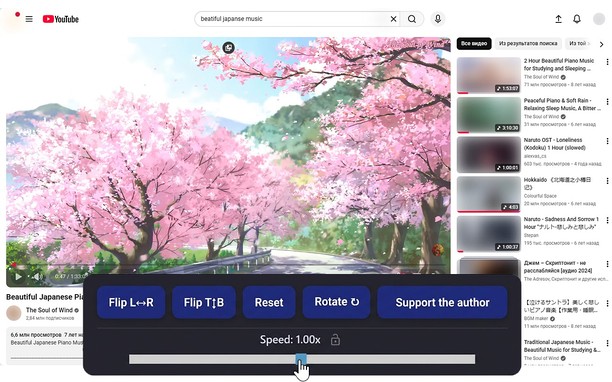
Reflects video vertically and horizontally, speeds up or slows down playback, rotates by 90°, and compresses video height and width — useful for fixing distorted videos.
How it works
Hotkeys:
Alt + * (NumPad): Show/hide control panel.
Alt + 1 / 3 (NumPad): Decrease or increase playback speed (step 0.01).
🔒 Lock near the speed — if you click it, it will remember any changed speed for the entire domain.
Alt + 4 / 6 (NumPad): Compress or stretch the frame horizontally.
Alt + 2 / 8 (NumPad): Compress or stretch the frame vertically.
Alt + 5 (NumPad): Reset all settings.
Alt + 7 (NumPad): Decrease frame size on both axes.
Alt + 9 (NumPad): Increase frame size on both axes.
Alt + 0 (NumPad): Rotate video 90°.
Compatibility:
Works on almost all sites.
Works in full-screen mode.
- This extension can access your data on all websites.
Screenshot
About the extension
- Downloads
- 10,211
- Category
- Productivity
- Version
- 1.4.0
- Size
- 60.3 KB
- Last update
- 17 Feb 2026
- Licence
- Privacy policy
Related
-
Evernote Web Clipper
Use the Evernote extension to save things you see on the web into your Evernote account.
Rating: Total number of ratings: 632
-
Atavi bookmarks
Visual bookmarks, bookmarks sync across various browsers and absolute safety for your bookmarks
Rating: Total number of ratings: 173
-
Color Temperature (Change Lux)
A lite and easy-to-use addon that adjusts the screen color to match the environment!
Rating: Total number of ratings: 10
-
Kodebrikkesjekken
Kodebrikkesjekken protects against fraud and ID theft for Norwegian BankID
Rating: Total number of ratings: 2
-
Simple Video Speed Controller
Automatically adjust video speed on any website.
Rating: Total number of ratings: 5