Opera browser required.
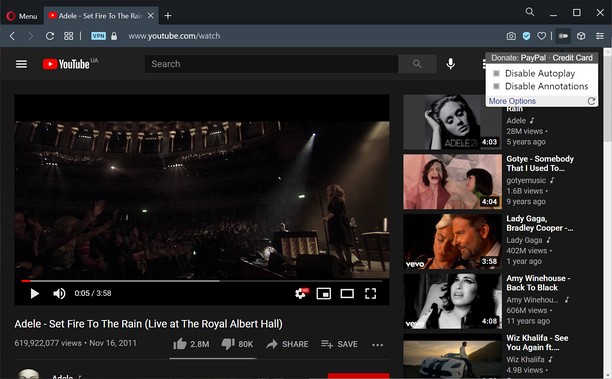
Turn off YouTube autoplay or turn off YouTube annotations. Also hides the toggle option when disabled.
Compatible with mobile and embedded YouTube videos as well.
For more features including removing recommendations, comments, and more, try the Unhook YouTube add-on: https://chrome.google.com/webstore/detail/unhook-remove-youtube-rec/khncfooichmfjbepaaaebmommgaepoid
Turn Off YouTube Autoplay Next & Annotations is available on:
- Opera: https://addons.opera.com/en/extensions/details/turn-off-youtube-autoplay-next-annotations/
- Chrome: https://chrome.google.com/webstore/detail/turn-off-youtube-autoplay/pcapooophggbaedfdmmmmbldmhlbbjob
- Firefox: https://addons.mozilla.org/firefox/addon/youtube-autoplay-annotations/
- Microsoft Edge: https://microsoftedge.microsoft.com/addons/detail/turn-off-youtube-autoplay/apdogalndjbldgojpfofdcdlmblgpjef
- This extension can access your data on some websites.
Screenshots
About the extension
- Downloads
- 2,061
- Category
- Productivity
- Version
- 1.0.8
- Size
- 11.3 KB
- Last update
- 20 Jan 2023
- Licence
- Privacy policy
- Service website
- https://unhook.app/
Related
-
Atavi bookmarks
Visual bookmarks, bookmarks sync across various browsers and absolute safety for your bookmarks
Rating: Total number of ratings: 171
-
Video Recorder
Easily record video & audio from your computer's camera!
Rating: Total number of ratings: 21
-
YouTube™ No Buffer (Stop Auto-playing)
Prevents YouTube HTML5 and Flash players from auto-buffering (auto-playing) videos
Rating: Total number of ratings: 33
-
Evernote Web Clipper
Use the Evernote extension to save things you see on the web into your Evernote account.
Rating: Total number of ratings: 613
-
Tab Discard (Suspender)
Easily suspend inactive tabs and save up memory for your browser.
Rating: Total number of ratings: 1