Opera browser required.
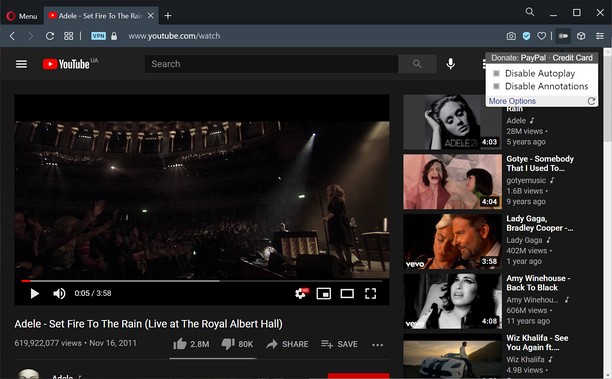
Turn off YouTube autoplay or turn off YouTube annotations. Also hides the toggle option when disabled.
Compatible with mobile and embedded YouTube videos as well.
For more features including removing recommendations, comments, and more, try the Unhook YouTube add-on: https://chrome.google.com/webstore/detail/unhook-remove-youtube-rec/khncfooichmfjbepaaaebmommgaepoid
Turn Off YouTube Autoplay Next & Annotations is available on:
- Opera: https://addons.opera.com/en/extensions/details/turn-off-youtube-autoplay-next-annotations/
- Chrome: https://chrome.google.com/webstore/detail/turn-off-youtube-autoplay/pcapooophggbaedfdmmmmbldmhlbbjob
- Firefox: https://addons.mozilla.org/firefox/addon/youtube-autoplay-annotations/
- Microsoft Edge: https://microsoftedge.microsoft.com/addons/detail/turn-off-youtube-autoplay/apdogalndjbldgojpfofdcdlmblgpjef
- This extension can access your data on some websites.
Screenshots
About the extension
- Downloads
- 1,668
- Category
- Productivity
- Version
- 1.0.8
- Size
- 11.3 KB
- Last update
- 20 Jan 2023
- Licence
- Privacy policy
- Service website
- https://unhook.app/
Related
-
Atavi bookmarks
Visual bookmarks, bookmarks sync across various browsers and absolute safety for your bookmarks
Rating: Total number of ratings: 177
-
Webmiu
This extension gathers what you want to miu on the web on a single page.
Rating: Total number of ratings: 4
-
Evernote Web Clipper
Use the Evernote extension to save things you see on the web into your Evernote account.
Rating: Total number of ratings: 651
-
Motivate Clock Extension
Time tracking extension, which allows to sync statistic of websites between browser and Motivate Clock desktop app for Windows.
Rating: Total number of ratings: 7
-
Percentage Calculator
Calculate Percentage value by applying percentage on an amount. Also calculates final amount by adding percent amount
Rating: Total number of ratings: 3