Opera browser required.
Instantly convert any timezone to your local time — just by selecting text on any webpage.
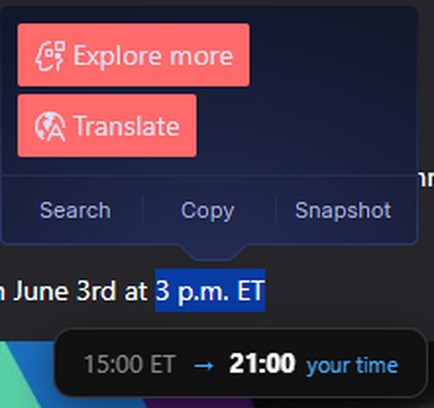
Browsing an international site and see "3 PM ET" or "15:00 UTC"? Simply highlight it and a tooltip appears with the converted time in your local timezone. No copy-pasting, no switching tabs, no mental math.
KEY FEATURES
• Works on any webpage — highlight a time, get the conversion instantly
• Supports both short (ET, CET, UTC) and full names (Eastern Time, Central European Time)
• Recognizes multiple formats: 3pm, 3 p.m., 3 P.M., 15:00 and more
• Select ranges like "4pm to 6pm ET" — all times convert at once
• Automatically adapts to your browser language (20 languages supported)
• 30+ timezones supported across all continents
• Lightweight — no data collected, no external requests, works fully offline
HOW TO USE
1. Find any time with a timezone on a webpage (e.g. "5:30 p.m. Eastern Time")
2. Select it with your mouse
3. Your local time appears instantly below the selection
No account needed. No permissions beyond reading the current page. Your data never leaves your device.
- This extension can access your data on all websites.
Screenshots
About the extension
- Downloads
- 615
- Category
- Productivity
- Version
- 1.3
- Size
- 18.6 KB
- Last update
- 23 Jul 2026
- Licence
- Copyright 2026 2e809169-9a04-4c9c-b726-0b609d704e24
Related
-
Boomerang for Gmail™
Allows you to schedule messages to be sent or returned at a later date.
Rating: Total number of ratings: 46
-
Evernote Web Clipper
Use the Evernote extension to save things you see on the web into your Evernote account.
Rating: Total number of ratings: 554
-
GIF Blocker
Block GIF and WebP animation images on HTML pages to reduce bandwidth and resource usage
Rating: Total number of ratings: 5
-
Auto Pause|Stop for YouTube™
Automatically pause or stop YouTube videos from playing
Rating: Total number of ratings: 14
-
Print this Image
Print Image of web page, with rapid preview, using context menu
Rating: Total number of ratings: 1