Opera browser required.
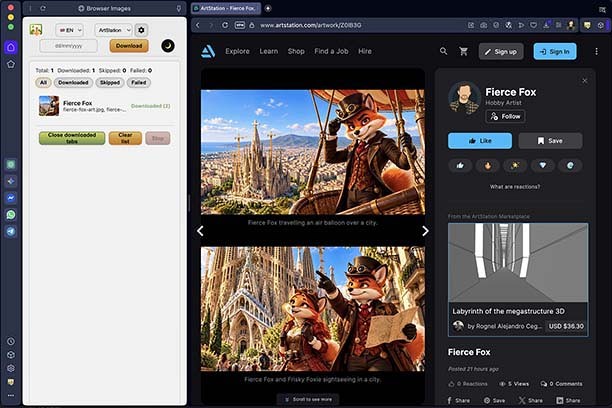
Browser Images downloads images and videos from supported gallery pages open in your browser tabs.
Open artworks, pins, projects or galleries, select ArtStation, DeviantArt or Pinterest in the extension panel, and press Download. Browser Images scans matching tabs and displays live progress for each one.
Features:
- Downloads images and supported videos from ArtStation, DeviantArt and Pinterest
- Supports multi-image projects, video clips and gallery pages
- Can skip files already present in browser download history
- Offers preview-size and video filtering options
- Uses adaptive download pacing to reduce server refusals
- Keeps the current download log while the browser remains open
- Provides an Opera sidebar with a toolbar-popup fallback
Videos embedded from external services such as YouTube or Vimeo are not downloaded.
Privacy:
Browser Images does not collect, transmit or sell personal data. Settings are stored locally, and temporary download progress is cleared when the browser restarts. Website access is limited to ArtStation, DeviantArt and Pinterest.
- This extension can access your data on some websites.
- This extension will add a panel to the sidebar.
Screenshot
About the extension
- Downloads
- 22
- Category
- Downloads
- Version
- 1.1.0
- Size
- 99.8 KB
- Last update
- 7 Oct 2026
- Licence
- Privacy policy
- Support page
- https://github.com/timpyrkov/browser-images/issues
- Source code page
- https://github.com/timpyrkov/browser-images
Related
-
Download to Firedrive
Easily download straight into your Firedrive account
Rating: Total number of ratings: 16
-
SaveFrom.net helper
Download YouTube, Facebook, VK.com and 40+ sites in one click.
Rating: Total number of ratings: 7074
-
YouTube™ to MP3
Convert & download YouTube videos to MP3 with just one click!
Rating: Total number of ratings: 65
-
MobileFlasherBD.com
Mobile Repairing Center
Rating: Total number of ratings: 4
-
Screenshot for YouTube™
Screenshot any video on YouTube in one click
Rating: Total number of ratings: 13