Απαιτείται Opera browser.
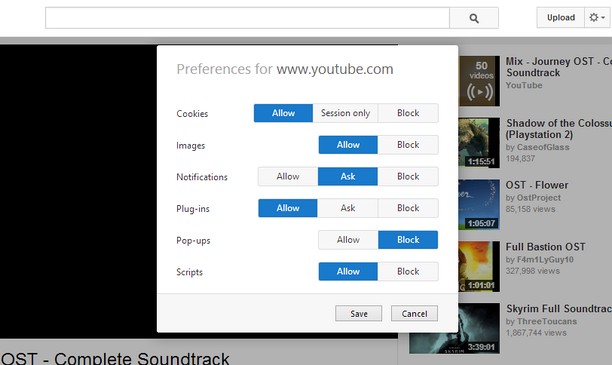
Site-specific Preferences brings back some of Opera 12's features for changing per-site settings. It lets you set whether Opera allows or blocks different types of content, such as plug-ins and pop-ups, for each site.
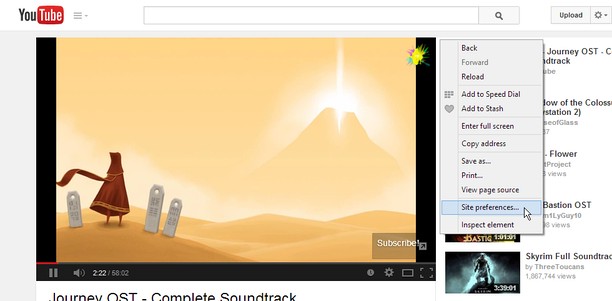
Just right-click the page background and select "Site preferences" to open the preferences for that site.
Using a certain, famous key sequence on the options page will let you allow, block or enable Click to play for individual plug-ins. This feature is experimental and might break things, so use it at your own risk.
Known Issues:
- Extensions are blocked on the Opera add-ons site, so the extension will not work here.
- The extensions API does not provide extensions with a list of the sites they have customized, so I cannot provide a centralized place to edit settings for multiple sites like in Opera 12's options page.
- Αυτή η επέκταση μπορεί να έχει πρόσβαση στα δεδομένα σας σε όλους τους ιστότοπους.
- Αυτή η επέκταση μπορεί να διαχειρίζεται ρυθμίσεις που ορίζουν αν οι ιστότοποι μπορούν να χρησιμοποιήσουν cookies, JavaScript και προσθήκες.
- Αυτή η επέκταση μπορεί να έχει πρόσβαση στις καρτέλες σας και στη δραστηριότητα περιήγησής σας.
Στιγμιότυπα
Πληροφορίες για την επέκταση
- Λήψεις
- 14.337
- Κατηγορία
- Παραγωγικότητα
- Έκδοση
- 1.2
- Μέγεθος
- 45,8 KB
- Last update
- 18/08/2014
- Άδεια
- Σελίδα υποστήριξης
- https://github.com/ChaosinaCan/SitePreferences/issues
- Σελίδα πηγαίου κώδικα
- https://github.com/ChaosinaCan/SitePreferences
Related
-
EX.UA/FS.UA без рекламы
Allows to disable the ad units: in the top, between the elements of the list, at the homepage, as well as on the search pages.
Βαθμολογία: Σύνολο βαθμολογήσεων: 9
-
Simple Notes
Simple notes in a panel, with a context menu item to copy text to a note.
Βαθμολογία: Σύνολο βαθμολογήσεων: 48
-
Atavi bookmarks
Visual bookmarks, bookmarks sync across various browsers and absolute safety for your bookmarks
Βαθμολογία: Σύνολο βαθμολογήσεων: 174
-
Snip Shot
Snip Shot is a user-friendly browser extension that simplifies the process of taking screenshots. With its one-click operation and intuitive user interface, users can quickly and easily capture any part of their screen and save it as an image. Snip Shot's minimalist design makes it a seamless addition to any browser, while its efficiency and usability make it the perfect tool for anyone who needs to take screenshots regularly.
Βαθμολογία: Σύνολο βαθμολογήσεων: 3
-
Evernote Web Clipper
Use the Evernote extension to save things you see on the web into your Evernote account.
Βαθμολογία: Σύνολο βαθμολογήσεων: 630