Opera-browseren kræves.
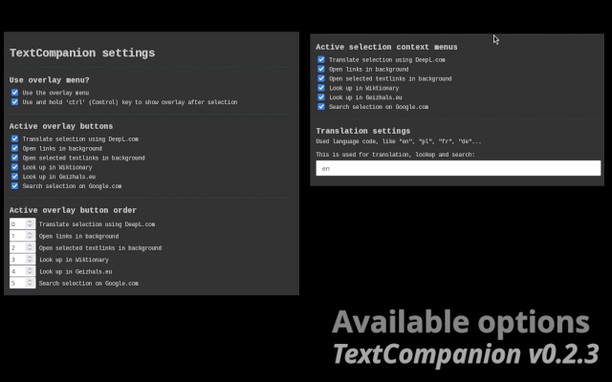
From the overlay menu, you can:
* open Deepl.com to translate the selection
* open links in background if links are selected
* open text written links in background if selected
* lookup at Wiktionary
* search at Geizhals.eu price comparison
* Google the selection
The overlay menu can be configured and reordered from inside the settings.
Context menu
* Use all or custom options from the overlay menu if anything is selected
* Quickly open addon settings from context menu
The menu can be configured from within the settings page of the addon as well as the default language for translation and lookup using the language ISO code.
There is a setting to use the "ctrl" (Control) key, if pressed and kept hold to show the overlay menu when making a selection. This is optional and if you do not choose this option, the overlay menu will show after every selection.
- Denne udvidelse kan få adgang til dine data på alle websteder.
Skærmbilleder
Om udvidelsen
- Antal downloads
- 1.810
- Kategori
- Søg
- Version
- 0.2.3
- Størrelse
- 49,5 KB
- Last update
- 10. marts 2025
- Licens
- Beskyttelse af personlige oplysninger
- Supportside
- https://github.com/jrie/textcompanion/issues
- Kildekodeside
- https://github.com/jrie/textcompanion
Related
-
JobsAlert
Our JobsAlert extension will search and show latest jobs a page using JobsAlert.pk
Bedømmelse: Antal bedømmelser i alt: 2
-
Lyric Finder
Instantly search song by lyrics, find translations, and discover music faster.
Bedømmelse: Antal bedømmelser i alt: 2
-
TinEye Reverse Image Search
This is the official TinEye Opera extension. Find out where an image came from, how it's used, or find higher resolution versions.
Bedømmelse: Antal bedømmelser i alt: 126
-
Google Reverse Image Search
Right-click on an image and perform a search with Google Lens. Icon by Daniel Bruce (Entypo Pack).
Bedømmelse: Antal bedømmelser i alt: 23
-
Search with Wikipedia™
Select and search in Wikipedia with mouse right-click.
Bedømmelse: Antal bedømmelser i alt: 3