Opera-browseren kræves.
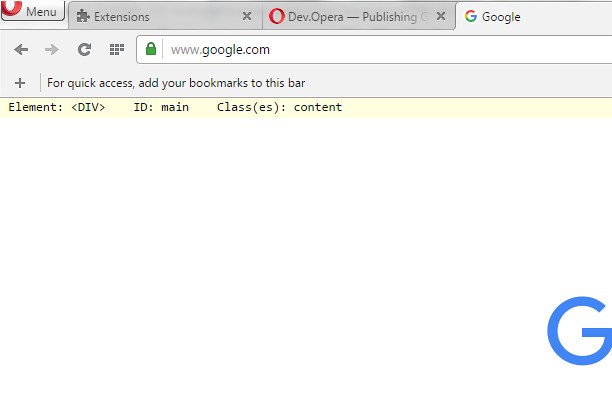
showHTML is a browser extension for developers and those who are curious about web page setup. It places a small text stripe at the top or bottom of any web page. As elements on the page are hovered over, details about each HTML element are displayed, including tag name, ID (if any) and classes (if any).
The text stripe is customizable to provide convenience and accessibility. In the options you can change the font size, color, and placement of the text stripe. You can also move the stripe while in use; clicking on the text stripe will toggle it between the top and bottom of the browser window.
There are two themes to choose from, which can be selected in the extension options, to avoid hard-to-read text overlay. The only permissions required by this extension are the 'activeTab' permission (to allow the information to be displayed on the web page) and the 'storage' permission (to save your theme setting).
Skærmbilleder
Om udvidelsen
- Antal downloads
- 7.061
- Kategori
- Developer Tools
- Version
- 1.1
- Størrelse
- 8,9 KB
- Last update
- 4. maj 2016
- Licens
- Copyright 2016 freginold
Related
-
Web Developer
Adds a toolbar button with various web developer tools. The official port of the Web Developer extension for Firefox.
Bedømmelse: Antal bedømmelser i alt: 112
-
Sheets2JSON - Convert Google Sheets
Convert public Google Sheets into clean JSON or CSV. Sheet2JSON is a lightweight extractor that reads Google Sheets and outputs structured data formats that are ready to use in websites, apps, and scripts.
Bedømmelse: Antal bedømmelser i alt: 0
-
Tech Finder - Website Technology Detector
Discover what technologies and frameworks websites are using with detailed analysis and categorization.
Bedømmelse: Antal bedømmelser i alt: 0
-
Yandex Wordstat Regions
Расширение, возвращает полное дерево регионов РФ в сервис подбора слов Яндекс (wordstat)
Bedømmelse: Antal bedømmelser i alt: 3
-
Web Widgetizer
Web Widgetizer is a extension offering a range of features to enhance browsing. It allows users to create separate Opera windows for specific websites, manage favorite links, customize window dimensions, toggle auto-start, and open links in popup tabs via button click or shortcut (Ctrl + Shift + A). This versatile tool optimizes browsing convenience and efficiency.
Bedømmelse: Antal bedømmelser i alt: 2