Opera-browseren kræves.
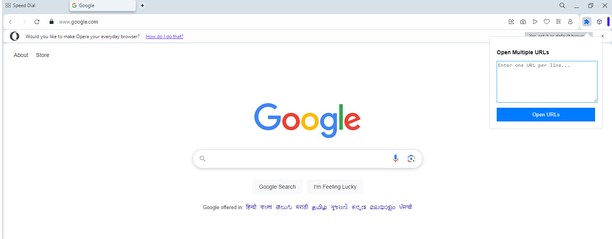
Do you often need to open multiple URLs at once? Whether you’re managing research, monitoring websites, or just multitasking, Multiple URL Opener makes it quick and easy to launch all your URLs in separate tabs with just a single click. This lightweight and user-friendly Opera extension is designed to simplify your workflow and save precious time.
Key Features:
Batch URL Opening: Enter multiple URLs in the text box and open them all instantly in new tabs.
Smart URL Formatting: Automatically detects and corrects URLs without "http://" or "https://" prefixes.
Customizable Input: Simply paste URLs from any source; no need for manual adjustments.
Secure and Private: No data is sent outside your browser. All operations happen locally for maximum privacy.
Simple Interface: Clean, intuitive design for seamless user experience.
Who Is This For?:
Researchers and Students: Manage and open multiple references effortlessly.
Web Developers and Testers: Quickly check multiple environments or domains.
Digital Marketers: Track campaigns, analytics, and reports across platforms.
Everyday Users: Save time when opening your favorite websites all at once.
How It Works:
Click on the Multiple URL Opener icon in your Opera toolbar.
Paste or type multiple URLs into the input box, with each URL on a new line.
Click the Open URLs button, and voilà! All URLs will open in separate tabs instantly.
- Denne udvidelse kan få adgang til dine data på alle websteder.
- Denne udvidelse kan få adgang til dine faner og din browseraktivitet.
Skærmbilleder
Om udvidelsen
- Antal downloads
- 2.215
- Kategori
- Produktivitet
- Version
- 1.0
- Størrelse
- 14,0 KB
- Last update
- 8. januar 2025
- Licens
- Beskyttelse af personlige oplysninger
- Websted for tjeneste
- https://magecomp.com/multiple-url-opener
- Supportside
- https://magecomp.com/contact
Related
-
ZIP Reader
View & extract any zip file via an easy-to-use UI right in your browser!
Bedømmelse: Antal bedømmelser i alt: 1
-
Page timer
place a timer into a webpage which will bring the page back at the end of the timer
Bedømmelse: Antal bedømmelser i alt: 10
-
Evernote Web Clipper
Brug Evernote-udvidelsen til at gemme ting du ser på nettet på din Evernote-konto.
Bedømmelse: Antal bedømmelser i alt: 535
-
Kto dzwonił – check phone number
Check a phone number, read opinions and report numbers. Full details on ktodzwonil24.pl.
Bedømmelse: Antal bedømmelser i alt: 0
-
Boomerang for Gmail™
Allows you to schedule messages to be sent or returned at a later date.
Bedømmelse: Antal bedømmelser i alt: 49