Изисква се браузър Opera.
Screen Recorder addon helps you record video from the computer's screen.
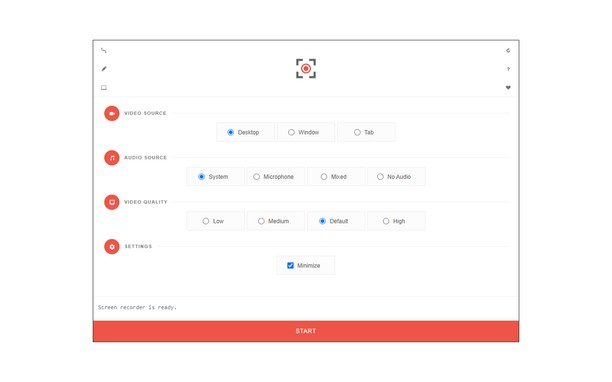
To work with this addon, please click on the toolbar button. Once the recorder interface appears, please adjust desired options, and then click the - Start - button. The video source could be your screen, window, or tab. The audio source can be the system's audio, microphone, mixed, or no audio at all. When you click the start button, a popup will appear within the interface. This popup window allows you to select the desired screen, tab, or window. To start recording please click on the - Share - button. When you are done recording the screen, please press the toolbar button (or the stop button on the app interface) to stop the recording process. The recorded video will be download to your computer automatically (on the default download location).
By default, recorded media is in - webm - format. To get more information about webm video format, please visit this Wikipedia page (https://en.wikipedia.org/wiki/WebM). If you want to change this format to a different one, please use a different software.
To report bugs, please fill the bug report form on the addon's homepage (https://mybrowseraddon.com/screen-recorder.html).
- Това разширение може да заснеме съдържанието на целия екран или на отделни раздели и прозорци.
- This extension can store an unlimited amount of client-side data.
Снимки
Относно разширението
- Сваляния
- 58225
- Категория
- Продуктивност
- Версия
- 0.1.5
- Големина
- 41,6 KБ
- Last update
- 01 Февруари 2023
- Лиценз
- Copyright 2021 moristong
- Страница за поддръжка
- https://mybrowseraddon.com/screen-recorder.html
Related
-
Image to PDF Converter : Save as Pdf
Save the current web page as a PDF file.
Оценка: Общ брой оценки: 0
-
Japanese Word of the Day
Learn new Japanese word every day. In the extension you'll find sample sentences with the word and native pronunciation.
Оценка: Общ брой оценки: 6
-
Evernote Web Clipper
Use the Evernote extension to save things you see on the web into your Evernote account.
Оценка: Общ брой оценки: 554
-
Boomerang for Gmail™
Allows you to schedule messages to be sent or returned at a later date.
Оценка: Общ брой оценки: 46
-
Symboard
Board with a symbols to use it in browsing and work. Copy symbol on click.
Оценка: Общ брой оценки: 4