Изисква се браузър Opera.
Stop copying and pasting prompts. Managing your AI templates in scattered text files or Notion documents ruins your workflow. Hunting for placeholder brackets and manually dragging the same reference files into new chats is a waste of time.
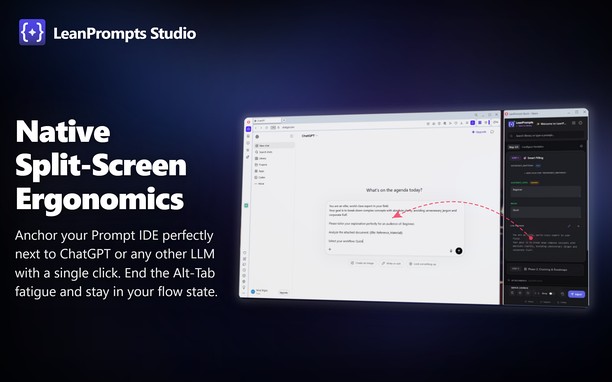
LeanPrompts Studio is a professional, local-first Prompt IDE that turns your AI interfaces into an execution engine. It separates prompt design from execution, letting you compile templates and inject them directly into ChatGPT, Claude, Gemini, DeepSeek, and others. The extension interface consists of a clean, dark-themed control center dashboard and a compact sidebar popup that docks beside your browser window.
How to use:
Simply open the LeanPrompts sidebar popup or use the global keyboard shortcut (Alt+Shift+Q) while visiting your favorite AI website. Select a prompt from your library, fill out any auto-generated variable fields, attach your files, and click "Inject" to instantly populate the AI input field and start the chat.
Key Features:
- Direct DOM Injection: Populates text fields and uploads files directly inside the active LLM tab, bypassing the system clipboard. Natively supports local offline Web-UIs like Ollama, LM Studio, and Jan.ai.
- Dynamic Templates: Define variables like {{Topic}} or dropdowns to auto-generate clean data-entry forms in your sidebar.
- Modular Snippets (@): Save personas or formatting rules as global snippets. Update them once, and they update in all templates.
- Prompt Chaining: Split complex tasks into sequential steps and inject them one-by-one to guide the AI and reduce hallucinations.
Privacy:
LeanPrompts requires no cloud accounts, no API keys, and stores all data entirely offline on your local machine.
Future Versions:
Planned updates for the optional Pro version include cross-device cloud synchronization and collaborative team workspaces, while the offline core remains entirely free.
- Това разширение може да осъществява достъп до данните ви във всички сайтове.
- Това разширение може да осъществява достъп до разделите и дейността на сърфиране.
- This extension can store an unlimited amount of client-side data.
Снимки
Относно разширението
- Сваляния
- 1
- Категория
- Продуктивност
- Версия
- 1.0.1
- Големина
- 589,0 KБ
- Last update
- 15 Юни 2026
- Лиценз
- Copyright 2026 16598d44-cbdd-4746-91a5-e812ae6eac9b
Related
-
Evernote Web Clipper
Use the Evernote extension to save things you see on the web into your Evernote account.
Оценка: Общ брой оценки: 630
-
Atavi bookmarks
Visual bookmarks, bookmarks sync across various browsers and absolute safety for your bookmarks
Оценка: Общ брой оценки: 175
-
Speed Test
Speed Test Most Accurate Online Broadband Internet Speed Test
Оценка: Общ брой оценки: 25
-
Desmos Unlocked
Browser extension for better user control of the Desmos graphing calculator configuration
Оценка: Общ брой оценки: 3
-
Snip Shot
Snip Shot is a user-friendly browser extension that simplifies the process of taking screenshots. With its one-click operation and intuitive user interface, users can quickly and easily capture any part of their screen and save it as an image. Snip Shot's minimalist design makes it a seamless addition to any browser, while its efficiency and usability make it the perfect tool for anyone who needs to take screenshots regularly.
Оценка: Общ брой оценки: 3