Изисква се браузър Opera.
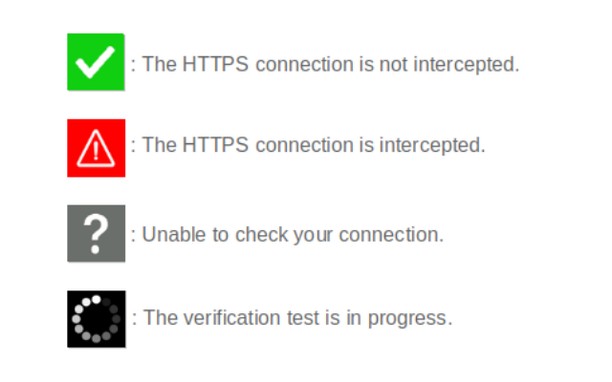
When browsing on secured sites ("https://..." websites), you can check the security status by clicking on the extension icon.
- The icon is green : your connection is not compromised;
- The icon is red : your connection is considered very risky (hijacked, modified, listened);
- The icon is gray : the verification is impossible (check server is unreachable, network error);
- The icon is black : the verification is in progress.
Technical details :
Normally, before encrypting an HTTPS connection, a secure website must prove its identity to your browser by sending it its security certificate. This certificate can be considered as an identity card issued by higher authorities (Certificate Authorities). There are several techniques of usurpation based on false certificates (false identity cards) or homographers (false names) to make you believe that a pirate site is the legitimate site you think you are visiting. These techniques allow pirate sites to retrieve your private information.
CheckMyHTTPS allows you to detect this type of practice, which can be implemented on open networks (WiFi in hotels, conference centers, stations, etc.) or even within your company via its firewall (SSL inspection). To detect this, the extension compares the certificate of the visited site that is received by your browser with the same certificate retrieved by an external check server located on the Internet. If the certificates differ, the identity of the server can be considered as usurped (red icon).
Respect for privacy :
The CheckMyHTTPS extension requires to send only two parameters to the check server :
- The domain name of the visited website;
- The IP address of the visited website.
You have free choice regarding the website to check.
Moreover, we give you the possibility to be free regarding the check server as you can make and host your own.
All explanations are detailed on the https://checkmyhttps.net project website.
- Това разширение може да осъществява достъп до данните ви във всички сайтове.
- This extension can create rich notifications and display them to you in the system tray.
- Това разширение може да осъществява достъп до разделите и дейността на сърфиране.
Снимки
Относно разширението
- Сваляния
- 1462
- Категория
- Продуктивност
- Версия
- 5.7.3
- Големина
- 316,1 KБ
- Last update
- 13 Март 2026
- Лиценз
- Декларация за поверителност
- Уебсайт на услугата
- https://checkmyhttps.net/
- Страница за поддръжка
- https://github.com/checkmyhttps/checkmyhttps/issues
- Страница с изходния код
- https://github.com/checkmyhttps/checkmyhttps/tree/master/Chromium
Related
-
Evernote Web Clipper
Use the Evernote extension to save things you see on the web into your Evernote account.
Оценка: Общ брой оценки: 634
-
Vertical Tabs
Manage your tabs in the sidebar!
Оценка: Общ брой оценки: 55
-
Atavi bookmarks
Visual bookmarks, bookmarks sync across various browsers and absolute safety for your bookmarks
Оценка: Общ брой оценки: 171
-
Video Speed Control
Mirror, stretch, compress, rotate and adjust playback speed of videos
Оценка: Общ брой оценки: 8
-
shorten-url : Professional URL shortener
URL shortener with lot of features, detailed stats, traffic filters, redirect rules, QR codes, password protected links and more.
Оценка: Общ брой оценки: 1